2016年10月10日 星期一

Outlook PST File 的使用建議

建議:
建議 Outlook 不要一開始就將信件收到 PST !!


微軟在 Outlook 2013 開始就已經拿掉傳送預設位置到PST的功能,這代表微軟以後不再支援此項設定.


Introduction to Outlook Data Files (.pst and .ost)
https://support.office.com/en-za/article/Introduction-to-Outlook-Data-Files-pst-and-ost-6d4197ec-1304-4b81-a17d-66d4eef30b78


You experience issues when your Exchange account uses Cached Exchange Mode and you set a .pst file as the default delivery location in Outlook
http://support.microsoft.com/zh-tw/kb/2701020/en-us


Exchange Server 2013 ECP/OWA 進不去

問題描述:
很突然的一個狀況,客戶的 Exchange Server 2013 ECP/OWA 全部連不上...服務都正常 !
重新開機還是無法解決....

解決方法:
透過 ADSI Editor,把 msExchCanaryDatax…這個值清掉,重新開機就好了

Open the ADSI editor,  go to CN=Services --> CN=Microsoft Exchange --> CN=  Right click CN=Client Access and click properties.  Scroll down to msExchCanaryData0.  Then erase the data from those settings.  Then restart all of the mailbox servers

2016年10月9日 星期日

Exchange Server 2013 無故重新開機

問題描述:
最近發現幾個案例,客戶的 Exchange Server 2013 會無故意外重新開機,在 Event Log 找到這些訊息...

Check 'Microsoft.Exchange.Monitoring.TcpListenerCheck' thrown an Exception! Exception - Microsoft.Exchange.Monitoring.ReplicationCheckHighPriorityFailedException: 高優先順序檢查 TcpListener 失敗。錯誤 伺服器 'MAIL01' Microsoft Exchange 複寫服務的 TCP 接聽程式未通過健康情況測試。此伺服器在錯誤解決前,無法參與複寫。錯誤: 與伺服器 'MAIL01' 通訊時發生錯誤。錯誤: 無法連線,因為目標電腦拒絕連線。 

原因分析:
看了很多 Event Log 以及 Exchange Log,後來發現該部 Exchange Server 有指定靜態的網域控制站(DCs),同時該部網域控制站(DCs) 日前已經降級....導致 Exchange Server ServiceHealthMSExchangeReplForceReboot 會造成停止錯誤並重新啟動 Exchange Server 2013

Exchange Server 中的網域名稱系統 (DNS) 名稱解析的原因失敗的錯誤設定的網路緩衝器

解決方法:
取消靜態指定網域控制站(DCs),同時指定正確的 DNS IP


參考文件:
http://support.microsoft.com/kb/2969070/zh-tw
檢閱下列 TechNet 文件中所提供的指導方針,並確定已適當地設定代表 MAPI 及複寫網路的網路介面卡。
http://technet.microsoft.com/en-us/library/dd638104 (v=exchg.150).aspx#NR

2016年10月8日 星期六

Exchange Server 2013 退信,Error :0x80040305-0x0004de-0x00054a with event 9646

問題描述:
Exchange Server 2013 用戶收到退信 Error :0x80040305-0x0004de-0x00054a with event 9646,User mailbox has hit session limits

解決方法:
1. On the mailbox server, click [Start], click [run], type “regedit”, and then click [OK].
2. Expand the following registry subkey:
\\HKEY_LOCAL_MACHINE\SYSTEM\CurrentControlSet\Services\MSExchangeIS\ParametersSystem
3. Right-click [ParametersSystem], point to New, and then click Key.
4. Type “MaxObjsPerMapiSession”, and then press ENTER to name the new subkey.
5. Right-click [MaxObjsPerMapiSession], click New, and then click [DWORD] Value.
6. Type Object_type, and then press ENTER to name the object.
    In most cases, the objects “objtMessage” , “objtFolder” and “objtFolderView” would exceed the 
    limitation, so we could create three objects for all of them(Replace Object_type with    
    objtMessage, objtFolder or objtFolderView).
7. Right-click Object_type, and then click Modify.
8. In the Value data box, type the number of objects that you want to limit this entry to, and then    
   click OK. For example, type 500 to increase the value for the objtMessage object. The default    
   value is 250. The default value of “objtFolder” and “objtFolderView” are all 500.
9.Restart Information Store Services.

參考知識文件: 
A user mailbox has hit session limits
http://technet.microsoft.com/en-us/library/ff360476(v=EXCHG.140).aspx

Outlook 2003/2007/2010/2013 收信亂碼

問題描述:
這一年來常常遇到有客戶反映,Outlook,Outlook 更新版本之後,反而收到系統或有些信件會出現亂碼,而有些同仁也是同樣更新 Outlook 版本,卻不會有這個問題...

解決方法:

1. 首先要確認 Outlook 是否有安裝到最新的 Service Pack 或更新。
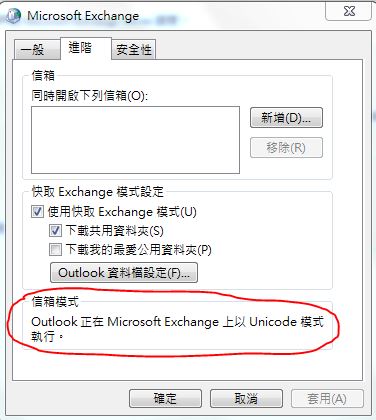
2. 檢查 Outlook Profile 裡面,信箱模式是否為 "Unicode" 模式,如果為 "非 Unicode" 模式,請重新設定 Outlook Profile !!

3. 很多使用者預設都將信件直接收到本磯 PST,時間久了也會造成異常,建議換一個新的
PST,或是統一將信件存放在伺服器端。

注意 : 新的版本已經不支援直接將信件收到本磯 PST,請大家統一將信件存放在伺服器端吧 !

2015年11月12日 星期四

Exchange Server 2013 無法收到 Gmail 寄來的信件

問題描述:
Exchange Server 2013 CU9,MX 記錄直接將信件導至 Exchange Server 2013,發現從 gmail 寄來的信件都無法收到 ! 從 Yahoo,Hinet....等等其他網域寄來的信進都可以正常收到。

解決方法:
由於 Exchange Server 2013 接收連接器預設啟用 TLS,將 TLS 關閉即可


2014年3月10日 星期一

Exchange Server 2010 MSExchange AuditLogSearch 4002 錯誤訊息

當你將 DB 刪除,Mount 一個空的 DB 時,Event Log 每 30 分鐘就會出現以下錯誤訊息

記錄檔名稱:         Application
來源:            MSExchange AuditLogSearch
日期:            2014/3/10 上午 08:55:44
事件識別碼:         4002
工作類別:          General
等級:            錯誤
關鍵字:           傳統
使用者:           不適用
電腦:            ex1.grandsi.com
描述:
A runtime exception occurred in AuditLogSearchServicelet's worker while processing a request. Exception:
Microsoft.Exchange.Data.Storage.ObjectNotFoundException: 提供的儲存區識別碼不是項目的識別碼。 ---> Microsoft.Mapi.MapiExceptionInvalidEntryId: MapiExceptionInvalidEntryId: Unable to open entry ID. (hr=0x80040107, ec=-2147221241)
Diagnostic context:
    Lid: 22318 
    Lid: 19246   StoreEc: 0x80040107
    Lid: 28014 
    Lid: 24942   StoreEc: 0x80040107

   Microsoft.Mapi.MapiExceptionHelper.ThrowIfError(String message, Int32 hresult, SafeExInterfaceHandle iUnknown, Exception innerException)
   Microsoft.Mapi.MapiStore.OpenEntry(Byte[] entryID, OpenEntryFlags flags)
   Microsoft.Exchange.Data.Storage.StoreSession.GetMapiProp(StoreObjectId id, OpenEntryFlags flags)

   --- 內部例外狀況堆疊追蹤的結尾 ---
 
解決方式:
只要將 Microsoft Exchange Service Host 服務重起就可以囉~~^^